
- Joined
- Feb 10, 2017
Done. When you test it, see if you're able to open the OS installer. It seems to do nothing for me.
Strange. Should default to a slightly stripped down but entirely functional version of the Ubiquity installer.
Follow along with the video below to see how to install our site as a web app on your home screen.
Note: This feature may not be available in some browsers.
Done. When you test it, see if you're able to open the OS installer. It seems to do nothing for me.

I ran it in bash and got a bevy of syntax errors. I'm guessing something didn't get sanitized properly. I'll troubleshoot later, but for now could you test it's boot time on your lower end devices?Strange. Should default to a slightly stripped down but entirely functional version of the Ubiquity installer.
I ran it in bash and got a bevy of syntax errors. I'm guessing something didn't get sanitized properly. I'll troubleshoot later, but for now could you test it's boot time on your lower end devices?


Let's just hope it's normie friendly enough. Remember they're the target audience. You think they'll be able to configure their shit in lisp?View attachment 889149
ok fixed: it sucks, it doesn't use SystemD, it has Guix as a package manager and it has XFCEses, Gnome and i3 (press F1 on the user login menu and it should let you choose i think)
right now i'm looking into a way to put a specific wallpaper in all DE's, but there doesn't seem to be such command, i'm sure as fuck that i won't fork Gnome/XFCE just to set a wallpaper at startup
also i fucked up something and i'm recompiling another image that will be uploaded somewhere

Let's just hope it's normie friendly enough. Remember they're the target audience. You think they'll be able to configure their shit in lisp?
(operating-system
  (locale "en_US.utf8")
  (timezone "Europe/Paris")
  (kernel KiwiOS)
  (firmware (append (list
         iwlwifi-firmware-nonfree)
            %base-firmware))

  (keyboard-layout (keyboard-layout "us" "euro"))
  (bootloader
    (bootloader-configuration
      (bootloader grub-bootloader)
      (target "/dev/sda")
      (keyboard-layout keyboard-layout)
      (theme %kiwi-theme)))

  (file-systems
   (cons*
    (file-system
     (mount-point "/")
     (device (file-system-label "a-root"))
     (type "ext4"))
    %base-file-systems))
  (host-name "hell")
  (users (cons* (user-account
                  (name "kiwi")
                  (comment "virgin with rage")
                  (group "users")
                  (home-directory "/home/kiwi")
          (password (crypt "kiwi" "$6$abc"))
                  (supplementary-groups
                    '("wheel" "netdev" "audio" "video" "kvm")))
                %base-user-accounts))
  (packages
    (append
      (list openbox
            nss-certs
        i3-wm
        tor)
      %base-packages))

  (services
    (append
     (list (service gnome-desktop-service-type)
       (service xfce-desktop-service-type)
       (service tor-service-type)
       (set-xorg-configuration
        (xorg-configuration
         (keyboard-layout keyboard-layout))))
    %desktop-services)))
Just re-install your old operating system over it. (this deletes all your files, so back them up if you care)if I wanted to uninstall this how would I do it?
I'm pretty sure you do not need to re-install your original OS after installing Linus/Windows if you have both on your computer/dual boot.Just re-install your old operating system over it. (this deletes all your files, so back them up if you care)
(or if you want to get more technical and switch to a different linux distro, separate / from /home and then just overwrite / with a new OS; this preserves all your files, but back them up anyways just to be safe lol)
If that's the case, just delete the linux partition and reallocate it to windows. Sorry, forgot people dual booted lol.I'm pretty sure you do not need to re-install your original OS after installing Linus/Windows if you have both on your computer/dual boot.
Use chroot.if I wanted to uninstall this how would I do it?
If that's the case, just delete the linux partition and reallocate it to windows. Sorry, forgot people dual booted lol.
I know, and I'm a lisp fanatic. I cuddle with SICP and beat people over the head with Clojure.don't think of lisp as some wizardry shit, it's actually really simple

I ran it in bash and got a bevy of syntax errors. I'm guessing something didn't get sanitized properly. I'll troubleshoot later, but for now could you test it's boot time on your lower end devices?
Shit hit the fan at work so I haven't had time to look. There's no text wrapping functionality in Conky, so I'd have to shrink the text size. The reason it's on top of everything is because whatever DWM is at play here stops rendering it the minute you click on the desktop if it's not run as a dock window; I hadn't realized it was persisting over windows, though. I have a screenshot from right before I generated the liveCD, so I have an environment I can easily modify.Got the tests done, and I got the installer to run fine initially, seems all that really broke was the automatic install by clicking the installer, typing ubiquity into the terminal made it work fine, but it crashed towards the end.
The loading of the LiveCD works fine (very fast, in fact), and the custom theme with random quotes works well too, though the text need reduced in size somewhat, even on widescreens some quotes are too long. Either that, or a word wrapping function depending on desktop length.
The quotes also tend to bleed over running programs, that could cause some UI feature issues, here's a slightly ghetto screenshot of this issue:
View attachment 890077
Some "system error reported" messages come up if you try mess around with programs in LiveCD mode, and looking at the installer logs as it progressed, it seems ubiquity might have had some issues, the Calamares installer may need installed as a fallback option to sidestep this if this is the problem. (had some issues determining it should be drawing from Ubuntu 18.04 repositories according to the logs for the ubiquity installer)

Tried it out on an old toaster today, and I couldn't get the installer to start either.Done. When you test it, see if you're able to open the OS installer. It seems to do nothing for me.

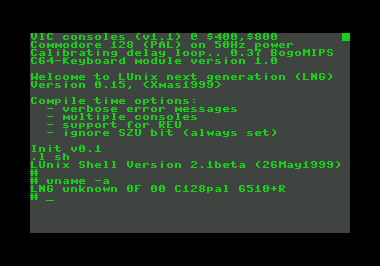
There literally is a C64 distro.No, that's what TAILS is for.
Fair point, my hardware goes on two ranges of "gaming PC" to "vintage computers." I don't think Linux runs on a C64 or a PowerBook, so I have never had a practical test of boot times on low end hardware. Why not make this a git repo so Kiwis can help flesh it out with pull reqs?
 en.m.wikipedia.org
