(Article) (Archive)

Microsoft is now using a Windows driver to prevent users from changing the configured Windows 10 and Windows 11 default browser through software or by manually modifying the Registry.
Windows users can still change their default browser through the Windows settings. However, those who utilized software to make the changes are now blocked by a driver quietly introduced to users worldwide as part of the February updates for Windows 10 (KB5034763) and Windows 11 (KB5034765).
IT consultant Christoph Kolbicz was the first to notice the change when his programs, SetUserFTA and SetDefaultBrowser, suddenly stopped working.
SetUserFTA is a command line program that lets Windows admins change file associations through login scripts and other methods. SetDefaultBrowser works similarly but is only for changing the default browser in Windows.
Starting with Windows 8, Microsoft introduced a new system for associating file extensions and URL protocols with default programs to prevent them from being tampered with by malware and malicious scripts.
This new system associates a file extension or URL protocol to a specially crafted hash stored under the UserChoice Registry keys.
For example, the default web browser assigned to the HTTPS URL protocol is found under:
If the correct hash is not used, Windows will ignore the Registry values and use the default program for this URL protocol, which is Microsoft Edge.
Kolbicz reverse engineered this hashing algorithm to create the SetUserFTA and SetDefaultBrowser programs to change default programs.
However, with the Windows 10 and Windows 11 February updates installed, Kolbicz noted that these Registry keys have now been locked down, giving errors when modified outside the Windows Settings.
For example, using the Windows Registry Editor to modify these settings gives an error stating, "Cannot edit Hash: Error writing the value's new contents."
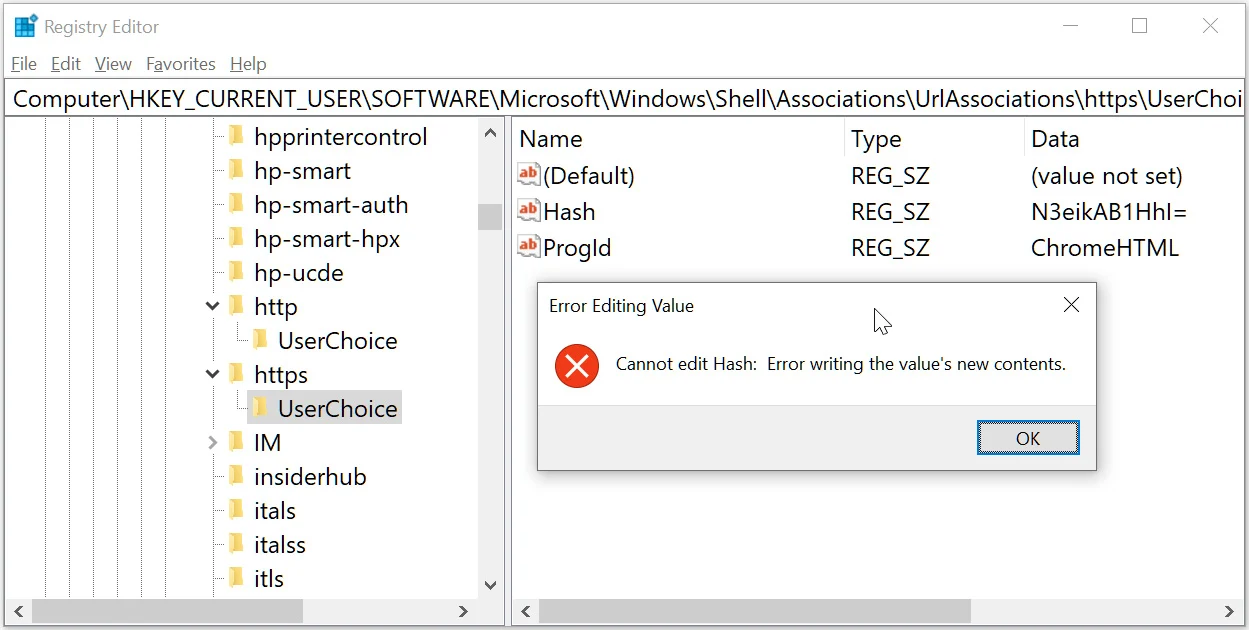
Locked down UserChoice Registry keys
Source: BleepingComputer
After further research, Kolbicz discovered that Microsoft introduced a new Windows filter driver (c windows\system32\drivers\UCPD.sys) as part of the February updates.
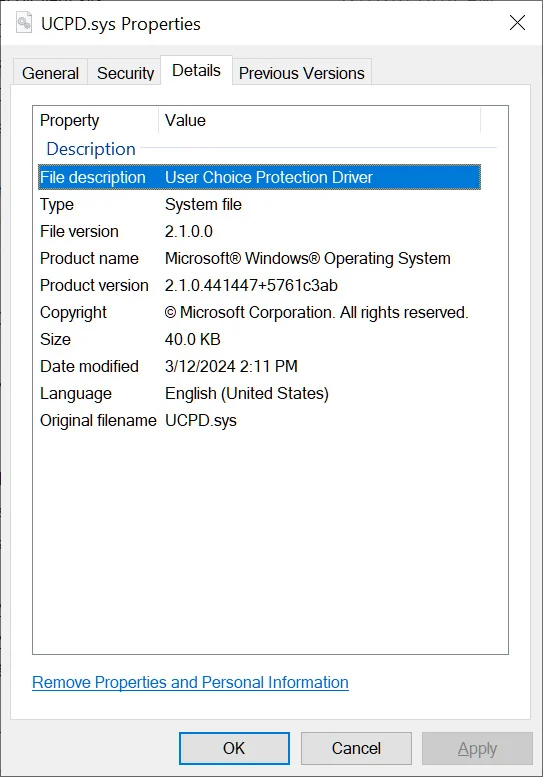
User Choice Protect Driver (UCPD.sys)
Source: BleepingComputer
This driver is described as a "User Choice Protection Driver," and when loaded, prevents direct editing of the Registry keys associated with the HTTP and HTTPS URL associations and the .PDF file association.
The associated Registry keys are:
It should be noted that in BleepingComputer's tests, the driver was rolled out to our Windows 11 and Windows 10 devices, but it only locked down the Registry keys on our Windows 10 devices.
In a blog post, Kolbicz explains that while you cannot unload the driver, you can disable it in the Registry.
UCPD velocity scheduled task
Source: BleepingComputer
Due to this, the only way to disable the driver is to turn it off via the Registry and delete/disable the Scheduled Task.
These designated gatekeepers are Alphabet, Amazon, Apple, ByteDance, Meta, and Microsoft, who had until March to comply with the new regulations.
In November 2023, Microsoft outlined changes coming to Windows in March 2024 to comply with the new DMA regulations.
These changes included new default browser policies for users in the European Economic Area (EEA) that force Windows to use users' default browser when opening a link rather than using Microsoft Edge.
"In the EEA, Windows will always use customers' configured app default settings for link and file types, including industry standard browser link types (http, https)," explained Microsoft.
"Apps choose how to open content on Windows, and some Microsoft apps will choose to open web content in Microsoft Edge."
However, this new driver has also rolled out to Windows 10 and Windows 11 devices in the USA that do not have to comply with the DMA act, shedding doubt on this theory.
Furthermore, even when the Registry settings are locked down and the device's default browser is Google Chrome, Windows still opened operating system links in Microsoft Edge in our tests.
In 2021, Mozilla also reverse engineered the Windows default browser hashing to make it easier for users to configure Firefox as the default browser.
Some have speculated that this change was introduced to block competing browsers from configuring itself as the default browser outside of the Windows Settings. Others said it could have been added as a security feature to prevent malware from making itself the default browser.
BleepingComputer contacted Microsoft about the lockdown of these Registry keys in March, but they said they had nothing to share at this time.
Update 4/7/24: Clarified to explain that manually meant manually through registry modifications and reiterated that you can still change the default browser via the Windows settings. Added further information on locked down browsers being ignored for operating system links in our US-based tests.
New Windows driver blocks software from changing default web browser
By Lawrence Abrams- April 7, 2024
- 10:17 AM
Microsoft is now using a Windows driver to prevent users from changing the configured Windows 10 and Windows 11 default browser through software or by manually modifying the Registry.
Windows users can still change their default browser through the Windows settings. However, those who utilized software to make the changes are now blocked by a driver quietly introduced to users worldwide as part of the February updates for Windows 10 (KB5034763) and Windows 11 (KB5034765).
IT consultant Christoph Kolbicz was the first to notice the change when his programs, SetUserFTA and SetDefaultBrowser, suddenly stopped working.
SetUserFTA is a command line program that lets Windows admins change file associations through login scripts and other methods. SetDefaultBrowser works similarly but is only for changing the default browser in Windows.
Starting with Windows 8, Microsoft introduced a new system for associating file extensions and URL protocols with default programs to prevent them from being tampered with by malware and malicious scripts.
This new system associates a file extension or URL protocol to a specially crafted hash stored under the UserChoice Registry keys.
For example, the default web browser assigned to the HTTPS URL protocol is found under:
Windows Registry Editor Version 5.00
[HKEY_CURRENT_USER\SOFTWARE\Microsoft\Windows\Shell\Associations\UrlAssociations\https\UserChoice]
"ProgId"="ChromeHTML"
"Hash"="N3eikAB1HhI="
If the correct hash is not used, Windows will ignore the Registry values and use the default program for this URL protocol, which is Microsoft Edge.
Kolbicz reverse engineered this hashing algorithm to create the SetUserFTA and SetDefaultBrowser programs to change default programs.
However, with the Windows 10 and Windows 11 February updates installed, Kolbicz noted that these Registry keys have now been locked down, giving errors when modified outside the Windows Settings.
For example, using the Windows Registry Editor to modify these settings gives an error stating, "Cannot edit Hash: Error writing the value's new contents."
Locked down UserChoice Registry keys
Source: BleepingComputer
After further research, Kolbicz discovered that Microsoft introduced a new Windows filter driver (c
windows\system32\drivers\UCPD.sys) as part of the February updates.User Choice Protect Driver (UCPD.sys)
Source: BleepingComputer
This driver is described as a "User Choice Protection Driver," and when loaded, prevents direct editing of the Registry keys associated with the HTTP and HTTPS URL associations and the .PDF file association.
The associated Registry keys are:
HKCU\Software\Microsoft\Windows\Shell\Associations\UrlAssociations\http\UserChoice
HKCU\Software\Microsoft\Windows\Shell\Associations\UrlAssociations\https\UserChoice
HKCU\Software\Microsoft\Windows\CurrentVersion\Explorer\FileExts\.pdf\UserChoice
It should be noted that in BleepingComputer's tests, the driver was rolled out to our Windows 11 and Windows 10 devices, but it only locked down the Registry keys on our Windows 10 devices.
In a blog post, Kolbicz explains that while you cannot unload the driver, you can disable it in the Registry.
However, a blog post by Gunnar Haslinger explains that a newly created 'UCPD velocity' scheduled task under \Microsoft\Windows\AppxDeploymentClient will automatically enable the service again if disabled."We cannot simply unload this driver, BUT we can of course disable it! this can be done by this one-liner – in an elevated PowerShell followed by a reboot.
New-ItemProperty -Path “HKLM: \SYSTEM\CurrentControlSet\Services\UCPD” -Name “Start” -Value 4 -PropertyType DWORD -Force
This brings back the functionality of SetUserFTA, but sadly requires administrative permissions and a reboot."
❖ Christoph Kolbicz
UCPD velocity scheduled task
Source: BleepingComputer
Due to this, the only way to disable the driver is to turn it off via the Registry and delete/disable the Scheduled Task.
Possibly related to DMA compliance
Kolbicz believes this change may be to comply with Europe's Digital Markets Act (DMA), which aims to ensure fair competition and the prevention of anti-competitive practices by six large companies, known as "gatekeepers."These designated gatekeepers are Alphabet, Amazon, Apple, ByteDance, Meta, and Microsoft, who had until March to comply with the new regulations.
In November 2023, Microsoft outlined changes coming to Windows in March 2024 to comply with the new DMA regulations.
These changes included new default browser policies for users in the European Economic Area (EEA) that force Windows to use users' default browser when opening a link rather than using Microsoft Edge.
"In the EEA, Windows will always use customers' configured app default settings for link and file types, including industry standard browser link types (http, https)," explained Microsoft.
"Apps choose how to open content on Windows, and some Microsoft apps will choose to open web content in Microsoft Edge."
However, this new driver has also rolled out to Windows 10 and Windows 11 devices in the USA that do not have to comply with the DMA act, shedding doubt on this theory.
Furthermore, even when the Registry settings are locked down and the device's default browser is Google Chrome, Windows still opened operating system links in Microsoft Edge in our tests.
In 2021, Mozilla also reverse engineered the Windows default browser hashing to make it easier for users to configure Firefox as the default browser.
Some have speculated that this change was introduced to block competing browsers from configuring itself as the default browser outside of the Windows Settings. Others said it could have been added as a security feature to prevent malware from making itself the default browser.
BleepingComputer contacted Microsoft about the lockdown of these Registry keys in March, but they said they had nothing to share at this time.
Update 4/7/24: Clarified to explain that manually meant manually through registry modifications and reiterated that you can still change the default browser via the Windows settings. Added further information on locked down browsers being ignored for operating system links in our US-based tests.


