Has anyone ever bought or used this keyboard?
I did and now it finally arrived. Bought me a Model M-style Classic F104.
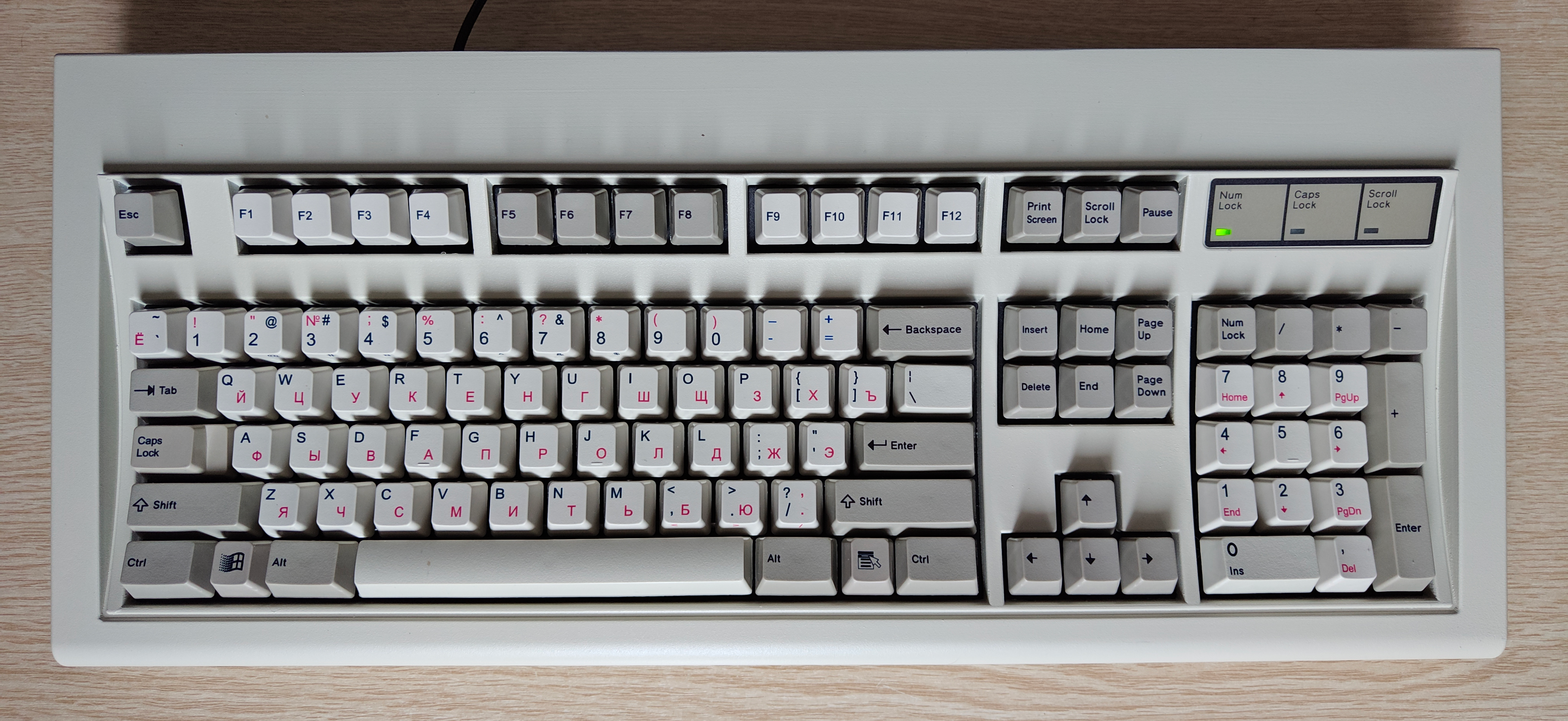
Here are some of my thoughts:
First of all, you need to keep in mind that when you buy this board, it comes with only the Space bar attached. You'll need to attach all the other keys yourself - apparently the mechanisms were getting dislodged far too often during shipping and thus weren't working properly, so this was a necessary measure. Which is fine, but you need to attach the plastic guides for 2U-keys too.
There are two types of plastic guides - black and white colored, they are used for vertical 2U keys (Plus and Enter keys on the numpad) and horizontal 2U keys (both Shifts, Enter, Backspace), respectively. And you can plug them in incorrectly. If that ever happens, you won't be able to attach the key, and you'll have to disassemble the entire board to remove the guide. Don't ask me how I know this.
In other words,
READ THE FUCKING MANUAL BEFORE ASSEMBLY. I CAN'T STRESS THIS ENOUGH.
Unlike Model Ms, the case is cast aluminum, so case creek straight up doesn't exist. It weighs 4 kilograms - you can legitimately beat somebody to death with it, and apparently earlier F62 and F77 models were made with cast zinc!
On topic of build quality - I really can't complain. No case creek, the space key isn't lopsided (like it is on my Unicomp Model M), the thing is built like a tank. Apparently earlier boards had issues with their controllers, but AFAIK it got fixed by now.
This is a USB keyboard, so no need to look for a PS/2 converter in case your computer doesn't have a PS/2 port. The cable is braided, doesn't feel like some cheap crap. How long will it last however, remains to be seen. The cable plugs into keyboard controller inside the keyboard, and there is also a clamp inside, which holds it in place. On one hand, that's a good thing - the cable won't come loose easily, and you can still unplug and replace it without doing any soldering. However, that also means that you'll have to disassemble the case in order to unplug it. And hey, if you want to make it a USB-C keyboard, all you have to do is replace the cable.
Speaking of disassembly: the back of the case has 6 easily accessible screws holding it, none of that stupid bullshit that corpos usually pull by hiding extra screws under the sticker and feet. Apparently earlier models used to use Phillips screws, but now they switched to Internal Hex Screws - those allegedly don't strip as easily.
One of the most annoying things about Model M is that, if you want to disassemble it completely in order to perform maintenance, you basically have to break it. That's because Model M's keyboard assembly is held together by breakable plastic rivets. Also these rivets tend to break off with time on their own, causing all sorts of issues. You can bolt mod it, of course, but it is a lengthy process that requires lots of drilling, and you can potentially ruin it if you aren't careful.
Meanwhile, this keyboard's assembly is held together with metal tabs instead, so you can relatively easily replace anything inside it (or clean it if you spill anything inside). The only complaint I have there is that you'll need to bend some of the tabs in order to separate the assembly, meaning those will eventually break off too, if you disassemble it too often.
Typing on it also feels different from my Unicomp board, but in a good way. Tactile feedback is very nice and crisp. The sound is very different - a little more higher-pitched than on my Unicomp, and very metallic. I watched a few videos of Model F typing demonstrations - it sounds just like that. It's as loud as a buckling spring board should be. But can be even
louder if you purchase and install an additional solenoid and a solenoid controller board. Then it would sound like a proper typewriter!
Unfortunately, unlike Model M, you can't change its height. Like Model F, there are 4 cork feet you can glue onto the bottom of it and that's all you get. If you want to change its height, you'll have to order extra feet on their
"Keyboard Feet/Bumpers" page (they screw into the bottom of the keyboard, there are 4 empty holes for them) - apparently if you want the same height as Model M its feet flipped out, you'll have to order "medium threaded" feet. Or, you know, you can buy some rubber feet at your local hardware store and nigger-rig it yourself - 16-19mm height is about right.
The keyboard controller is programmable, and it supports keyboard mapping software such as
Vial. Normally the left blank key acts like a Windows key, and blank right key functions like a Fn key. With Vial you can change these keys (and also any other keys) to whatever you want, including macros.
Also, another thing to consider - the keyboard support full NKRO, but normally it is set to 6KRO for compatibility reasons. You'll have to use Vial to enable NKRO.
Now, all of this is great, but you'll have to also consider the cost. $400 minus shipping - ouch! You can get a Unicomp Classic (or New Model M for that matter) for less than half of that!
This product is clearly for enthusiasts only. If you just want a buckling spring keyboard, without the Model F tech and everything that comes with it - Unicomp's got you covered, those are fairly decent boards, even though the build quality for their "classic" keyboards is all over the place.
Also, another thing that bothers me - when I got the board, the sticker on the back is already coming off. And apparently it's a common problem. Whatever adhesive those guys are using is clearly not the same industrial-grade stuff IBM and Lexmark used (and Unicomp still uses - my board is 6 years old now, and all the stickers are in place). I realize it's not that big of a deal, but come on!
Furthermore, LGR did a video on an F77 board, and apparently after a while the LED overlay sticker started to come off too. Mine hasn't fallen off yet, so how long this one will last remains to be seen.
By the way, just to make it clear - this keyboard does support Unicomp-made keycaps too. That's how I got Windows 95-era keys on it (normally those 2 keys are blank) as well as a standard Russian key layout (for some reason the layout they normally provide has Russian letters on top-left of the key, and English letters on bottom-right - virtually nobody else does this, so I went with something more conventional).
Pros:
* Full metal case
* Model M layout with Model F technology - the best of both worlds
* NKRO
* Easy to reconfigure
* Easy to disassemble/reassemble and repair, everything can be replaced
Cons:
* Price
* Comes partially disassembled, you'll have to put the keys on it yourself
* Easy to fuck up the assembly process, if you don't RTFM
* Adhesive on the stickers wears off pretty fast.
Final thoughts: despite everything, this is an amazing fucking board. It feels wonderful to type on, and with its build quality and repairability it will probably outlast me.
Now, if you're only looking to dabble into the whole "buckling spring keyboard" thing, then you may be better off with a Unicomp board (or a vintage IBM Model M, if you can get it for cheap), because it is pricy, but it's worth the price IMO, despite some of its quirks.


