KiwiOS - Linux pre-setup for Kiwis or, if you like, AutismOS

  • Want to keep track of this thread?
    Accounts can bookmark posts, watch threads for updates, and jump back to where you stopped reading.
    Create account
No, that's what TAILS is for.


Fair point, my hardware goes on two ranges of "gaming PC" to "vintage computers." I don't think Linux runs on a C64 or a PowerBook, so I have never had a practical test of boot times on low end hardware. Why not make this a git repo so Kiwis can help flesh it out with pull reqs?

Not the type who is skilled enough to build Linux from Scratch or install Gentoo without a lot of help. This was a quick and dirty project to cobble together some of the most recommended Kiwi recommended Linux stuff into one pre-setup OS. I used the Pinguy Builder tool to do most of the work after customizing it in a VM sandbox, then after some tests on both my gaming PC and a few others I have lying around (one is a toaster fit for web surfing and little more, and one is about in the middle between my good and crap PC), I then uploaded the ISO to archive.org to save myself bandwidth and made it available here.

If a more dedicated project towards that end was based on or inspired by this, I'd be all for it though.
 
and which would those programs be btw? I can only think of Tor and a web browser

The Readme included at archive.org mentions the basics.

I did not include Tor from the official repositories since that constantly gets updated and I didn't to leave a Goatse level security hole.

I did, however, include the Mozilla Firefox browser and the Brave Browser (which bundles Tor). The latter was installed via snapd because getting Brave installed on Linux by default is an exercise in tedium. The snapd version will auto update and works on damn near any install of Linux, and I wanted this to be as idiotproof as possible.


i'm assuming that logging in after installation will require my SSN, DOB, and several credit card numbers?

Nope, simple LiveCD, no passwords or other info needed.

I could have made an exact snapshot which would have saved some Kiwi style tweaks to the theme (like custom icons and wallpaper) and some presaved bookmarks in the web browsers, but it also would have ported over the entire contents of the /home folder, and that made it run like utter shit as a LiveCD because of all the garbage saved like temp files I don't have the autism to sift out first.

Tried to optimize the snapshot versions I made, but could never get load times to be decent when booted in LiveCD mode, so I decided not to bother and went with just including all the programs and slimmed down unessential components before bundling as a custom distro in basic LiveCD format without needing a username or password.
 
and which would those programs be btw? I can only think of Tor and a web browser
Audacity
BleachBit
Brave
Putty (Not sure why, since SSH/Telnet/Serial is built in to the Linux kernel. Maybe to be more user friendly?)
qBittorrent
Steam
Thunderbird
uGet
YouTube DL
Edit: No TOR, I'd recommend TAILS for your darkweb liveCD needs.

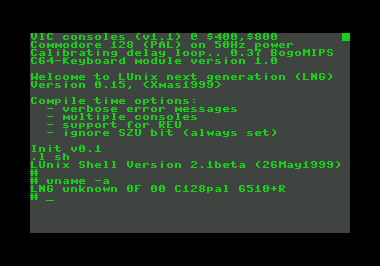
It can and it does.
Holy shit, you're... kind of right? It's not the Linux kernel but it is a *nixlike distro for C64
 
Audacity
BleachBit
Brave
Putty (Not sure why, since SSH/Telnet/Serial is built in to the Linux kernel. Maybe to be more user friendly?)
qBittorrent
Steam
Thunderbird
uGet
YouTube DL

PuTTY was included because it was more user friendly. Besides, having used it myself, I found it easy to set up.

Audacity is a wonderful one stop audio editing shop,

Brave is obvious. Mozilla was provided as a fallback browser.

qBittorrent I found better than Transmission, like uTorrent before it turned into adware.

Steam I just left the installer, only install it completely if you want to dick around with gaming or mess with Wine/Proton for running Windows games.

Thunderbird was a suggestion Null had in the software thread and having used it, I concur with.

And Youtube DL (with GUI) was for people using Brave who hate how Chrome based browsers refuse to DL Youtube videos
 
I'm reinstalling Photoshop, I'll probably at some point make a more KF-branded version of the LiveCD. What's the highest resolution (transparency preferred) copy of the KF logo?
 
SVG and PNG
Perfect, thanks!
Here's what little I've got now:
1565642964716.png

What are the typefaces in the KiwiFarms logo? I want to edit the wallpaper a bit, it's a little too dark and subdued as just the forum's BG.

1565643886907.png
I'm thinking something like this, with the bottom box being used as a Conky resource monitor and to rotate random.txt quotes. @GethN7 opinions? I don't want to add too much to the image lest I go in vain of your low-overhead goal.
 
Last edited:
How do I install this on Windows 7??


Should be just as useful for Windows 7.

If you want to dualboot, have Windows installed first. Linux modifies the boot record so Linux and Windows play nice together, but Windows has to be installed first.
 
If you just want to play around with it, I'd recommend using VirtualBox to run a vm of it. Installing it in dual boot means stealing free space away from your windows install. Or you could just run it from the Live CD without actually installing it.

I worked on making this in a Virtual Machine sandbox, means any fuckups in the VM don't touch my actual operating system, though I did test installs outside of one to test how well it would run as an OS on it's own.

I only recommend dual booting if both Windows and Linux have things you just can't do well in the other and thus you need both.

Usually, that boils down to Windows being for gaming and Linux for web applications and server stuff in my experience.

Wine/Proton has made some amazing strides bridging the gaming gap on Linux, but even at their best, Windows is better for dedicated gaming. I didn't bother adding Wine to the distro I made because this was primarily based on Linux specific programs, not trying to bridge the Windows gap.
 

Should be just as useful for Windows 7.

If you want to dualboot, have Windows installed first. Linux modifies the boot record so Linux and Windows play nice together, but Windows has to be installed first.

Now I feel bad
 
Perfect, thanks!
Here's what little I've got now:
View attachment 887688

What are the typefaces in the KiwiFarms logo? I want to edit the wallpaper a bit, it's a little too dark and subdued as just the forum's BG.

View attachment 887720
I'm thinking something like this, with the bottom box being used as a Conky resource monitor and to rotate random.txt quotes. @GethN7 opinions? I don't want to add too much to the image lest I go in vain of your low-overhead goal.

Actually, I like the direction you are going with this. So long as it doesn't turn boot times into a crawl, it's a good idea you have here, wish I had that level of skill.
 
Back
Top Bottom