Instructions on how to remove the Windows Pride Flag from Taskbar

  • 🏰 The Fediverse is up. If you know, you know.
  • Want to keep track of this thread?
    Accounts can bookmark posts, watch threads for updates, and jump back to where you stopped reading.
    Create account

HarveyMCR

Casualty of the Culture War
kiwifarms.net
Joined
Jun 9, 2018
If you're a windows cuck like me who doesn't like Bill Gates shoving that gay shit down your throat, then you may have been surprised when you noticed a LGBTQI+ flag on your windows search bar. You may have been even more surprised that it is now the middle of June, and you are only just now noticing it. I know I was, and if it weren't for Josh's mention of it today, I would still be living in gay ignorance. I guess I'm just really apathetic to the tranny shit that my mind just blocks it out without even processing it anymore.

1655483435972.png


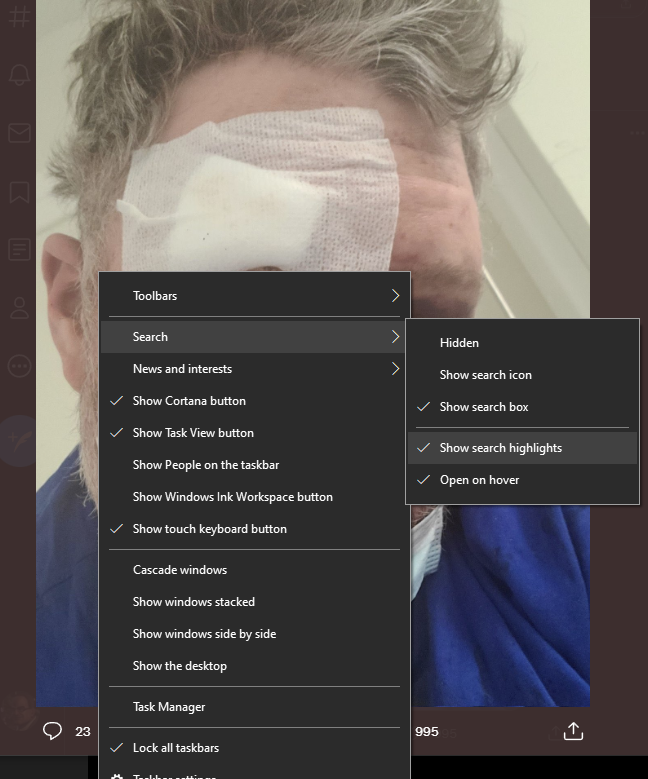
Anyways, it's a simple fix to get rid of, but our """friends""" over at MS have made it as unintuitive as possible to remove. What you're going to want to do is right click on the search bar, hover over "search", and then uncheck "Show Search Highlights".
1655483703074.png

1655483757919.png

Voila, your desktop is now at least 42% less gay.

Happy trails and please be safe this most blessed month.
 
I was trying to figure out how to get rid of it before it turned gay. No one had the answer.
 
I especially hate that it's just "pride" now instead of "lgbt pride". Like gays have a claim on pride. First they took the rainbow, now they are taking the concept of pride.
 
Rainbow Capitalism is back at it again baby!!!!

Ok, but seriously since I already have a dualboot at this point I'm ready to jump ship whenever Linux/Unix actually becomes normal people-friendly, if I have to be an autistic troon or a privacysperg to even find a use in it then no thanks.

No I'm not kidding, Microsoft can keep its AIDS riddled OS and its virtue-signaling to themselves for all I care FFS.
 
Helps me find files for work all the time. Just type in the reference number a document was saved as and voila, no digging through folders required.
You get the same functionality by opening the start menu and typing there, the bar is completely redundant and unnecesary.
 
You get the same functionality by opening the start menu and typing there, the bar is completely redundant and unnecesary.
It's quicker to just type directly in the search bar if I'm using the cursor. Occasionally I still pop the start menu that takes a shitload of space with the 'windows' key, but I'm really not a fan of the thing so I really prefer the search bar on Win10.
 
I run a dual-boot of Windows 10 and EndevorOS. When I saw the fag-flag in my taskbark I almost switched back to my linux distro... unfortunately, I cannot run Quickbooks (which I need for work) or my heavily-modded copy of Fallout: New Vegas on Linux, so I have to have Windows.

Thank you for the info! I like how my taskbar has joined the 42% now :)
 
Back
Top Bottom
