I'm enjoying my time with KiCad for a project. Of course, if it was just designing a PCB that would be boring. I decided "hey, I want to make my own PCB" so I got a CNC router, finally re-built the electronics for it and now, many months later where I could have had 30 or 40 retries of PCBs made by a fab I'm almost ready to mill my own.
It's sort of fun figuring all this shit out. As you all know, "professional" PCBs are double sided and use something called "Plated Through Holes"(PTH) for connecting components. Which means for things like a Raspberry Pi Hat you can install the Pi connector facing down and all the other parts facing up. You can, of course, mill your own double sided PCB and even do PTH at home. The problem is doing copper plating is a pain in the ass, to get a thick enough layer you need to electroplate, which means the surface of the inside of a hole must already be conductive. There's various DIY solutions. One is to suck conductive ink through the holes and use that. Another involves electroless copper plating, but it's very thin. This requires a chemical that's nearly impossible for 'normal' people to get as it's also a drug making component. But there are now companies making kits, presumably with the naughty component mixed in so it can't be used. And they're expensive. Once the hole walls are activated by ink or plating then you do the electroplating with simpler chemicals like sulfuric acid. Another PTH option is little press-in eyelets, but they use a lot of space and for boards with connectors it might not work well.
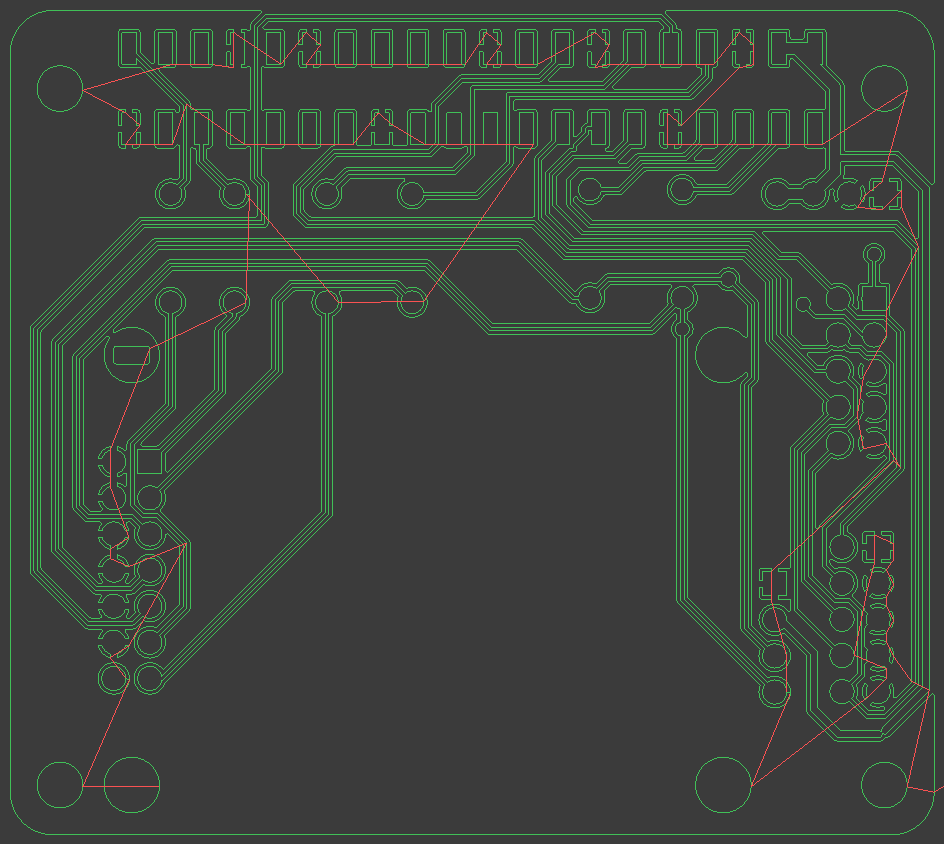
So, I took the lazy way out, a single sided board. But the connector for the Pi needs to be on the opposite side. So, the easiest way seems to be to make it a surface mount part and the rest of the stuff through-hole so they end up on the 'proper' side. The other thing single sided loses is "easy" ground planes since they're everywhere if you fill both sides and maybe just a couple vias to connect them. I ended up pushing traces around for quite a while to let the ground fill get as many spots as I could. Still ended up with 6 wire bridges, 2 for data and 4 to bring in a couple grounds I needed.
And the copper milling path might look something like this, maybe, thanks to pcb2gcode. There will also be a drilling holes file and a cut the edge out file.
Don't know about the size of what you have but might be worth keeping an eye on the voron cascade cnc so once documentation is out you can upgrade/build one as making tools to make tools is cool.
Don't know about the size of what you have but might be worth keeping an eye on the voron cascade cnc so once documentation is out you can upgrade/build one as making tools to make tools is cool.
Does anyone know of a tool for winding inductance coils like pic attached?
The end result is very similar but I need to repeat the task of winding 170 turns of 0.5mm of enameled magnet wire around a 19mm diameter 3D printed cylinder and would like a better way of doing this process as winding by hand is too time consuming and prone to failure. I need to do this around >100 times.
I'm looking at something like this, but I'm not sure if it would work for this task as it has to be evenly wound with no spacing between each turn.
Any suggestions or info anyone can share? Thank you!!!
I'm working on a control board for my MiSTer FPGA which will handle power control to it and the SBC in the same box, temp sensing, fan speed and a few other things.
I've finished my CNC, but now I need to do the PCB.
I have a few options.
1. Outsource to China(cheaper) or the US(more expensive) with about a week turnaround for either. If I screw up the design I'm out another week.
2. Mill it on the CNC. The problem here is one thing this board will do is be a USB switch, as the one I had was far larger and was a bit dumb soldering wires to it for control. And USB 2.0 is pretty tolerant to trace routing. But all the USB switch chips are tiny SMD.
3. Etch it and use the mill for holes and cutouts. If the milling doesn't work I want to try using the mill with a laser to expose the etch-resist(my laser has a 0.1mmx0.1mm spot, supposedly) and then I can etch it and then put it back to drill it. Seems like a pain in the ass, but we'll see.
How small is the tiny SMD.
Really fucking small. The big one on the right is a standard 0.100" header, so 2.54mm center to center. Easy to mill.
The lower footprint is my 0805 capacitor at 0.08 inches by 0.05 inches or 2mm x 1.2mm. Still pretty easy.
The problem is the upper left. It's a 0.5mm pitch device with 0.2mm spaces and 0.3mm pads.
Initial attempts on the mill have lead to a blank square. So further testing is needed. I am doing leveling but I obviously haven't gotten it dialed in.
Or maybe I'll just go team etching.
Here's the latest test, you can start to make out where the pads are supposed to be. I had some bits that were supposedly 0.1mm tips, but apparently they weren't concentric so they were cutting circles and made a mess of things. These seem better, now I need to work on auto-leveling and getting the depth of cut even shallower. The big pads look fine.
That's exactly the right tool for the job. It's just there to spin the coil form faster and keep count. You use your hands to guide the wire and keep it tidy and tight.
If you're only making one you could just do it by hand instead and just mark the wire every 10 turns or so to not lose count. That's how I've always done it.
I have determined my CNC can indeed mill PCBs for 0.5mm pitch SMD ICs. I've also determined I'm not going to bother.
The leveling needs to be near perfect, in the neighborhood of 0.02mm. The auto-leveler for a 5x5 grid on a tiny sample still wasn't quite enough.
You can see the pins are now visible for the device but the upper left of the border isn't right. And the number of leveling points for a full PCB would be immense.
So, my next plan is to use another suggestion from the Internet. Spray the PCB with black paint then use a so-called "LASER"* to ablate the black paint in the areas to be etched. The downside to this is it needs to be put on the CNC router, "LASER"ed, then pulled off, etched, and put back for the hole drilling. So I also need to finish my alignment microscope mount too. But the etchant has been ordered, choosing Ammonium Persulfate this time as I've used it in the distant past. All the cool kids are using bathtub etchant made with HCl and H2O2, but, well, that sounds a bit too fun for me. The nice thing is the beam divergence should be far more tolerant to depth errors and need not nearly the accuracy of trying to mill.
Another option would be to use photosensitive etch resist and use the "LASER" to expose that, if the black paint idea doesn't work well that would be next. This is, of course, how they did it in the good old days but with printed stencils for the photo exposure.
Yeah, milling at the precision for SMD stuff requires a terrifyingly tiny and expensive bit, a viciously high RPM spindle and really gentle feeding speeds, the purpose built PCB engravers run in the neighborhood of 30k to even 100k RPM (and you want to keep your face FAR, FAR AWAY because a snapped bit will launch itself at a random trajectory like a fucking bullet). Doing it with a standard engraver bit won't really cut it.
For creating home gamer double-sided boards, put down oversized vias in your EDA and just solder in a (clipped) component leg on both sides. You'll really need to be on top of your alignment though, triple check before hitting the go button or dropping it in your UV box.
I tried the ablating paint with the laser thing and it was a pain, and I never got what I considered good results. So I threw out all my pcb2gcode settings and tried milling again. While I wait for some tracing paper and accessories to try dry-film resist.
The first one is a UQFN-10 0.4mm pitch
And it's fucking spectacular.
Since it's isolation routing it didn't clean up some of the excess copper, but that's fine, and I think one of the settings I had screwed up previously.
The second is a VSSOP-10 at 0.5mm pitch.
It's less clean but still usable. I need to check the auto-level map and see what's going on there. need to scrub the board and see if it cleans up. Also need to pull the board at some point and check it with an actual microscope instead of the "Spindle" camera.
These were done with the finest in 0.1mm tip, 30 degree carbide engraving cutters from Amazon, 10 for $15. The only downside is the high resolution of leveling points. I need to check how far out it is and if I can get away with fewer.
I have seen a lot of words spoken about modern electronics, and perhaps entirely too many about old video game consoles for my taste. I'll be blunt: I do not care about video games. Any of them. They don't interest me. On the same token, I understand and respect if you, dear reader, do not care about some dusty old shit 60 years obsolete. So if you were perhaps:
Curious about antique electronics
Don't want to read about baby boomers having endless pissing contests about how much money they waste invest to listen to the Beatles
Were curious about recapping,
then I hope this post is useful, succint, and interesting for you. Please don't feel condescended if I state the obvious: that isn't my intention. Little srrrp is not a writer, and does not wish to use SoCal Demons to speak for ximxer.
I'd also like to say that if you feel that I am trying to show off how oh-so-clever I am, I apologize for that as well. What I am doing here is very easy, babby's first project stuff, and anyone with some time and common sense can easily do this. I felt that it would be refreshing to look backwards a little for those of you who are unfamiliar with this sort of thing, for those of you who love forgotten/obsolete technology, and for those who want whitepilled on just how far we as a species have advanced in technology in only a century or so.
Vacuum tube circuits were sold in the glorious Good Old Days before lawsuit culture, and before we were collectively forced to cater to the dimmest mouth-breathing retards consuming oxygen. HIGH VOLTAGE IS DANGEROUS AND WILL KILL YOU. IT IS YOUR RESPONSIBILITY TO TAKE ALL NECESSARY SAFETY PRECAUTIONS. Kiwi Farms staff, users, employees, and/or the author of this text ARE NOT RESPONSIBLE if you are too retarded to take safety precautions. Put on your safety glasses, RUBBER soled & fully enclosed shoes, and keep one hand in your pocket when working with live voltage.
Here today I have my faithful vacuum tube tester, the Heathkit TC-2. It was assembled in 1950-something and definitely looks it. It can perform basic tests on just about any vacuum tube: American, Western European, even Soviet. You plug a tube into its mating socket, set the dials and switches as needed, turn it on, wait a minute or so for the tube to heat up, and flip the TEST switch. All of the settings you need for most American tubes of the era are in the Rolodex-type thing in the middle. It does all this with a transformer, some resistors, ONE capacitor, and ONE copper oxide diode. It doesn't even have a circuit board. Some might sneer at how primitive it is, especially these days where people think something two years old is LITERALLY ANCIENT, but I think its simplicity is brilliant, and dare I say it, beautiful. To give the futurists here some credit, it needs pointed out that I would not be able to use this website without modern semiconductors and integrated circuits, and I am grateful for that.
Vacuum tubes are the technology we had for electrical switching and amplification in-between the era of electromechanical relays and germanium/silicon. Their era of dominance in was from about the turn of the century until about 1960, when early transistors became commercially viable for the consumer market. They work much differently from transistors, but perform the same tasks. They work using heat and high voltage to push electrons out of the cathode. The electrons move through a gap of vacuum and strike the anode, completing the circuit. In-between the anode and cathode can be anywhere from zero to six very finely wound coils of wires, referred to as "grids." A voltage on the grid will attract or repulse electrons on their journey from the cathode to the anode.
The era of the vacuum tube is long over. They hang on in a diminishing number of niche uses. Unless you have a CRT monitor/television around the house, or you are one of those pretentious audiophiles that I have no patience for, the only consumer device you see them in anymore is a microwave oven. You might be able to see some in service in
very high-powered RF transmitters
Soviet military equipment
Situations where you need to detect a single photon
nuclear weapon triggers, although krytrons aren't STRICTLY vacuum tubes.
I think it is a matter of time before solid-state replaces them in these places as well.
Anyway, what's wrong with this thing? It's unplugged and I have a screwdriver. Let's peep this out.
Aha. A 75 year old, wax paper and brain-cancer-oil electrolytic capacitor.
This capacitor is actually working just fine, and looks like it is in great shape. Usually they are so worn they look as if they were deep-fried, with old bubbles of wax and VERY TOXIC electrolyte crusted all over them, and I suppose in a sense they ARE deep-fried. That said I always replace electrolyic capacitors and selenium diodes whether or not they seem okay. They go bad with age and it's a matter of time before they fail, often catastrophically in things this old, where AT LEAST 200 volts DC is quite normal. This is one reason why you should NEVER just plug in antique electronics without AT LEAST a thorough once-over, and a Variac with a fuse built in. In this situation, if the capacitor exploded or caught fire, it would destroy the scroll of settings, which I probably can't replace. My broken heart would also be irreplaceable.
Thankfully, just about any antique capacitor can be replaced with a modern equivalent. You may have to replace one old capacitor with two or more in series and/or parallel, but that's okay: modern capacitors are MUCH smaller than the old ones, and usually better quality to boot. Some purists like to hollow out the old capacitor, stuff a new one inside, and glue it back together for appearance's sake. I'm not going to bother with this.
If you've never replaced capacitors before, it is ABSOLUTELY CRITICAL that you observe the voltage rating. You can usually get away with a close-ish capacitance value since tolerances back then were so loose (+/- 50% or MORE was typical) but you MUST observe the voltage rating. Usually I go far above that rating, with as high a voltage rating as possible. *Yes* you can put capacitors in series to achieve a higher voltage rating, but I don't personally like doing that unless I have absolutely no other option. If you need to ask how to do this, I recommend you don't and get someone who knows what they're doing to help you. There's a bit of a difference between 15 volts of exploding capacitor and 300+ volts of exploding capacitor. I've witnessed it in person.
Another VERY IMPORTANT factor to observe is the polarity. This capacitor, despite the stripe on one end, is actually NOT polarized. Wax and paper capacitors used to mark which lead went to the outer foil for signal shielding reasons that rarely matter anymore with modern capacitors. You'll know a polarized capacitor when you see a + sign on one end. If you do see it, you MUST make sure the new capacitor goes in the circuit the SAME WAY the old one did. If you put the new capacitor in backwards, don't worry: the capacitor will let you know by spraying boiling oil and paper fragments everywhere.
Luckily I had the perfect replacement laying around already.
Before you start slicing and soldering away, you should discharge all of the capacitors in the circuit with a high wattage resistor. Getting bit by a charged, high voltage capacitor HURTS at best, and will KILL YOU at worst. I speak from experience. I used to use a screwdriver, but I ended up welding the shaft of the screwdriver to a capacitor. Using a resistor is much safer, and much gentler on the electronics anyways. I have a 50 watt chassis-mount resistor mounted on a heatsink partially for this reason, but just about any wirewound resistor with AT LEAST a 5 watt rating will suffice, more being preferrable. Let it sit for a minute, and check the voltage across the capacitor is ZERO volts with a multimeter.
Snip away the old capacitor...
...and done. Piss easy. I covered the paper scroll with a few layers of aluminum foil to protect the very flammable antique paper from my butane soldering iron's exhaust, and from my hands: skin oil and sweat isn't good for old paper.
Sadly, the leads aren't long enough to mate with the old wires.
That's okay though; I have some spare antique-style, cloth-insulated wire to extend the legs. Any fire-retardant wire of the same gauge would be fine, and cost significantly less, but this is what I've got and I don't feel like ordering another spool of wire. Fuck it.
I always use LEAD electronics solder since it flows much easier and I don't plan on tasting my work. If you feel the need to put such things in your mouth, I recommend a psychiatrist or a less destructive eating disorder.
Before the capacitor gets put back in, I need to insulate the naked leads. Heat shrink tubing is best for this. I love the stuff: you'll never use electrical tape again after trying it. You can find it at any auto parts store, along with solder, desoldering braid, and even disposable soldering irons. It's very simple to use: cut a piece off, stick it over the naked wire, and heat it. Usually I just use the exhaust from my butane soldering iron, but rubbing the tip over it until it shrinks works too.
New capacitor soldered in place. Take great care not to melt any wires or get any resistors too hot: moreso than modern things. Antique carbon resistors like to fluxuate in resistance A LOT in value if they are heated for too long. Wire is often very fragile after several decades as well, although it should be noted the wire in this thing is in BEAUTIFUL shape considering how old it is.
Done. I put the face plate back in the box and tightened the screws catercorner, step-torqueing them until nothing moves. I can just SEND IT now, right? Not quite. It's a great idea to never trust yourself. An ounce of prevention is worth a pound of cure, and probably a good bit of money too if you made a really bad mistake. I would use one of these: a Variac, also known as an autotransformer.
These are GREAT. This is one of the tools I didn't know I needed until I bought one. They let you turn the voltage up from zero to full line voltage slowly, so you can hopefully catch a fatal mistake before it does too much damage. Having one with a fuse adds another layer of protection in cases where the original device never had a fuse (this Heathkit does NOT.) Another benefit I don't see mentioned is for troubleshooting: You can set the output voltage to exactly match whatever line voltage the schematic originally called for, which makes troubleshooting entirely analog circuits easier. Young 'uns are spoiled what with these gol' durn voltage regutalators and stitched mode power supplies. In the GOOD OL' days, we didn't use SHIT. We used got damn ohm's law.
I turned up the voltage slowly and nothing exploded or smelled weird. I grabbed a tube from one of my piles of tubes and wa-la.
The tube plugged into the tester is a 5U4GT. This was a very common tube in its day, and for those who are curious, it's two diodes in one tube, used as the main full-wave rectifier for the DC power supply. This tube needs a lot of power to heat itself, even for a vacuum tube: It needs 15 watts, (5 volts AC @ 3 amperes, to be specific) and will dissipate at least 15 watts of heat, no matter how much it is rectifying. You can see the two cathodes glowing red-hot at the top of the tube, as they should be. If you think they look sort of like an incandescent light, it's not a coincidence. Vacuum tubes actually evolved from them, and the very first tubes WERE modified light bulbs.
Here's a to-scale comparison of the 5U4GT from RCA's datasheet, alongside the much more modern replacement. The modern replacement, two silicon diodes, dissipate exactly 0 watts while doing nothing, will never burn out, and can handle MUCH higher surge currents. Recent advances in semiconductors have allowed diodes even smaller than that.
Remember how I said we didn't have voltage regulators before Joe Biden mandated everyone buy a coffin in the desert to defend Iran or something? There actually is a vacuum tube voltage regulator, known as the gas discharge tube. This is a Soviet one, the СГ15П-2. I'm oversimplifying, but it works more or less the same as a neon light. Like neon lights, they are quite pretty while in operation. A bit whimsical even.
Maybe an SMPS is much more practical and efficient, but does it innately glow purple as it operates? Didn't think so.
Thank you for reading.
I swear I've seen little neon bulbs the size of miniature Christmas lights used in circuits for exactly this purpose, as a regulated voltage reference.
I swear I've seen little neon bulbs the size of miniature Christmas lights used in circuits for exactly this purpose, as a regulated voltage reference.
You probably did. Passing current through a chemically inert gas has a roughly constant voltage drop, and were used in all the same ways zener diodes are used today, in addition to being used for illumination. I have seen some devices even use a neon lamp for both purposes simultaneously: as a voltage reference AND as the pilot lamp.
Here's an article you might find interesting. Neon lamps can even be used as active circuit elements in digital circuits!
Ok, I've figured out most of my CNC PCB issues. Runout was too high. Cleaning out the spindle taper and getting a better collet seems to have helped considerably and I'm now consistently getting 0.2 width with a 0.1mm 20 degree cutter. Will still need level probing but not nearly as dense as I thought. My problem was thinking my cuts were too wide because it was too deep. No, deep(0.05mm, maybe deeper) is fine with a 20 degree bit if it's not jiggling all over the place.
I give you, what may be the tiniest kiwi on the site.
The logo doesn't do well with isolation milling, I probably need to invert it so it's the milled space or something.
The part to the left is a 0.4mm pitch UQFN.
Ok, I've figured out most of my CNC PCB issues. Runout was too high. Cleaning out the spindle taper and getting a better collet seems to have helped considerably and I'm now consistently getting 0.2 width with a 0.1mm 20 degree cutter. Will still need level probing but not nearly as dense as I thought. My problem was thinking my cuts were too wide because it was too deep. No, deep(0.05mm, maybe deeper) is fine with a 20 degree bit if it's not jiggling all over the place.
I give you, what may be the tiniest kiwi on the site. View attachment 8697483
The logo doesn't do well with isolation milling, I probably need to invert it so it's the milled space or something.
The part to the left is a 0.4mm pitch UQFN.
I feel like I've seen more CNC PCB routing the last 2 years than the last 20. Did toner transfer go completely out of style? I respect it though, I've never spun up my own PCB, just sent them out to get made
Ok, I've figured out most of my CNC PCB issues. Runout was too high. Cleaning out the spindle taper and getting a better collet seems to have helped considerably and I'm now consistently getting 0.2 width with a 0.1mm 20 degree cutter. Will still need level probing but not nearly as dense as I thought. My problem was thinking my cuts were too wide because it was too deep. No, deep(0.05mm, maybe deeper) is fine with a 20 degree bit if it's not jiggling all over the place.
I give you, what may be the tiniest kiwi on the site. View attachment 8697483
The logo doesn't do well with isolation milling, I probably need to invert it so it's the milled space or something.
The part to the left is a 0.4mm pitch UQFN.
Why do you need to probe the surface to maintain parallelism of the cut? Wouldn't it be much simpler to just mill the table underneath, so as to ensure that the table is square to the spindle? A CNC router ought to be able to mill aluminum with a solid, uncoated, 2-flute, tungsten carbide endmill, up to 1/4" tool diameter. I've done it many times with 0.03" depth of cut. I also saw that you had some trouble with the tool having runout. They make toolholders intended for use with reamers in CNC machines that you can adjust axially and tram true to the spindle. I'm not sure if they are made with ER taper though: I've only seen them for toolholders with retension knobs (i.e. CAT, BT).
I feel like I've seen more CNC PCB routing the last 2 years than the last 20. Did toner transfer go completely out of style? I respect it though, I've never spun up my own PCB, just sent them out to get made
Maybe it's just because toner transfer is very finnicky, the chemicals can be hazardous, expensive, and hard to dispose of. The price of home CNC hardware has come down so much, and you usually have to use a CNC machine to drill the board anyway. So therefore, if you have to put it on a machine anyways, why not mill the foil as well and you can be confident that the traces will line up with the holes, barring any WPC errors?
Why do you need to probe the surface to maintain parallelism of the cut? Wouldn't it be much simpler to just mill the table underneath, so as to ensure that the table is square to the spindle?
Chinese PCB material is not flat. Actually, most isn't flat. I use an MDF spoilboard which does get resurfaced. The depth of cut for PCB needs to be about 0.1mm or 4 thou. Deeper than that and the V widh of the bit starts causing problems. With better Chinese collets I've gotten runout down but now I think I'm getting vibration issues, so I need to do some test cuts at various speeds and feeds and see how the results look before optimizng any further.
I feel like I've seen more CNC PCB routing the last 2 years than the last 20. Did toner transfer go completely out of style? I respect it though, I've never spun up my own PCB, just sent them out to get made
Milling is a 1 step processs. Well, it never leaves the mill, mill traces, drill holes, cut outline, just change bits a couple times. A bit more if you soldermask. Also modern lasers I think are all "Eco" now and while my 20 years ago laser did fine I don't know that my current one would lay down enough toner.
Chinese PCB material is not flat. Actually, most isn't flat. I use an MDF spoilboard which does get resurfaced. The depth of cut for PCB needs to be about 0.1mm or 4 thou. Deeper than that and the V widh of the bit starts causing problems. With better Chinese collets I've gotten runout down but now I think I'm getting vibration issues, so I need to do some test cuts at various speeds and feeds and see how the results look before optimizng any further.
Milling is a 1 step processs. Well, it never leaves the mill, mill traces, drill holes, cut outline, just change bits a couple times. A bit more if you soldermask. Also modern lasers I think are all "Eco" now and while my 20 years ago laser did fine I don't know that my current one would lay down enough toner.
Machining a bell/box/bowl/cup shaped object with an open end.
Your fixture and/or machine isn't rigid enough.
Your feeds and speeds are wrong.
It sounds to me like it might be the second one. MDF is not even remotely rigid. Have you tried using something more solid, like a metal, or even a heavy and stiff plastic? If you went that route, you would be able to drill and tap it, which would allow you to torque down the fasteners for more consistent clamping pressure. Please correct me if I'm wrong, but since you're using MDF, I'm assuming you use wood screws or something similar to hold down boards?
I don't know how much machining experience you have, so PLEASE stop me if I'm preaching to the choir.
EDIT: I forgot to mention this: Did you do any spring cuts when you milled the spoilboard? A lot of machines won't get a surface flat unless you do something like this. I'm milling a pretend hypothetical object that only needs one cut across.
G90
G0Z1.
X-1.Y0.
G1Z0.F48.
X1.
G4P0.1
G1X-1.
G0Z1.
Nitto P-02, just like most people. Clamping thin stock is hard without bending, double stick tape is easy. Cutting forces for the PCB trace milling is basically 0 you could probably hold it with scotch tape, and I think one vendor even recommends it. It seems to be possibly vibrations due to the spindle/collet/collet nut/tool assembly. But that's pretty easy to check once I'm home in a couple weeks and just run a few different speeds. Most sane people don't try and mill 8 mil trace/spaces. At present I'm getting 10mil spaces which will work but is not optimal. best possible with the bits I'm using(20 degree 0.1mm tip, 0.1mm depth) is about 6 mil.